Skip to content

Your Vivo experience

Your care team, in your pocket.

When you start a program with Vivo Health Solutions, you get more than a prescription. You get the Vivo app: your protocol, medications, refills, lab results and care team, all in one secure place.

Download the Vivo app on the App StoreGet the Vivo app on Google Play
The Vivo web patient portal home in a desktop browser: sidebar navigation, a greeting with Request a refill and Message the care team, summary cards, today's medications, orders and recent updates
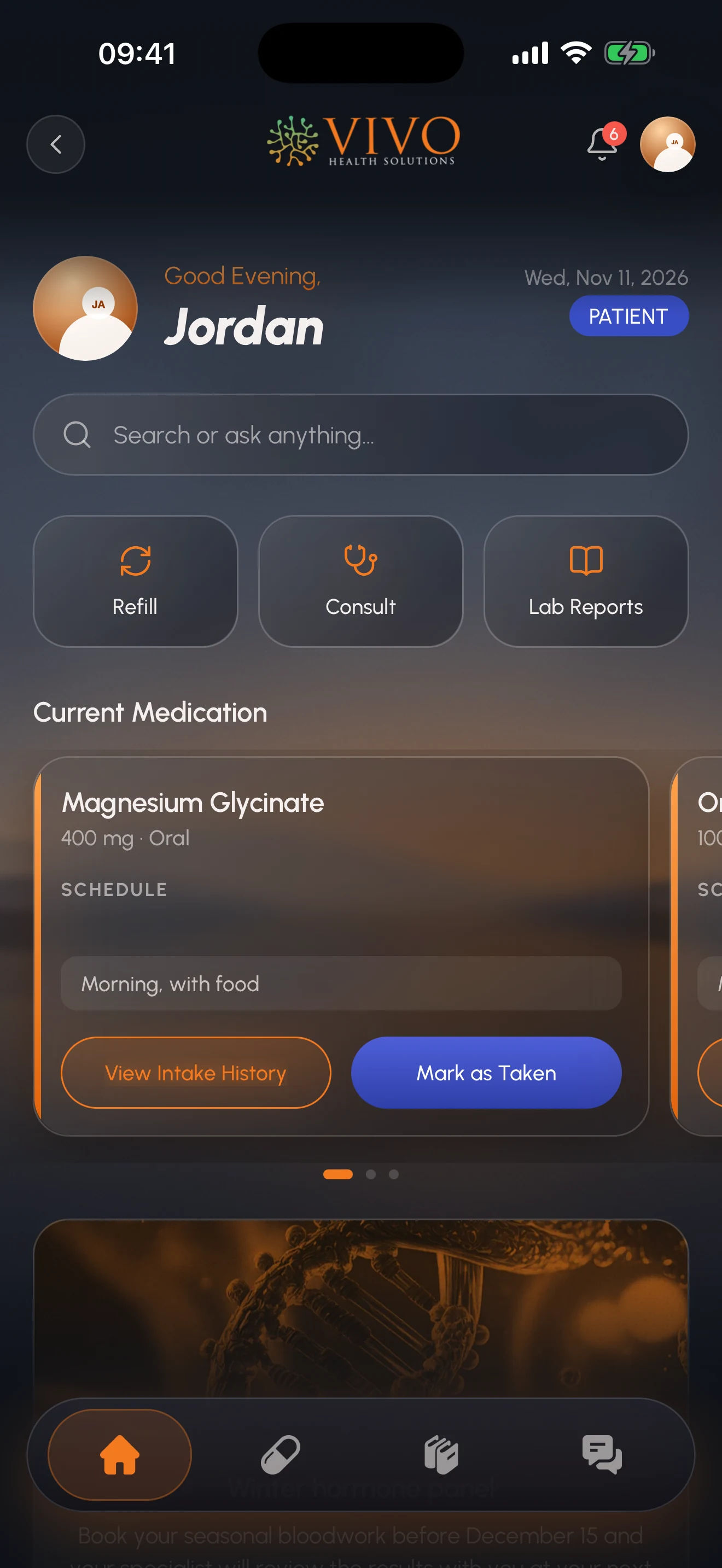
The Vivo app home screen on iPhone: an evening greeting, search, Refill, Consult and Lab Reports shortcuts, and the current medication card with Mark as Taken

How it starts

No sign-up form. Your account is tied to your care.

It's the same experience wherever you are: on your iPhone, on your Android phone, or on your computer through the web patient portal.

  1. Step 1

    You start your program.

    After your consultation, the Vivo care team creates your account. There's no sign-up form, because your account is tied to your care.

  2. Step 2

    You get an email from Vivo.

    It explains how to download the app and set your password.

  3. Step 3

    You explore.

    Your protocol, your schedule and your care team are ready when you sign in. Look around before your Clinical Care Team reaches out, so you know exactly what support looks like with Vivo.

What you'll find inside

Everything about your care, one tap away.

Follow a patient's week in the app. Each step shows the iPhone app and the same screen in the web patient portal.

Chapter 1 · Your day

Every day starts on Home.

01Step 1 of 9

Home: today, at a glance

Open the app and see what matters today: the medications on your plan, when your next dose is due, and one-tap shortcuts to request a refill, book a consult or open your lab reports.

  • iPhone and Android app
  • Web portal: Sign in with the same account and pick up where you left off.
The Vivo web patient portal home in a desktop browser: sidebar navigation, a greeting with Request a refill and Message the care team, summary cards, today's medications, orders and recent updates
The Vivo app home screen on iPhone: an evening greeting, search, Refill, Consult and Lab Reports shortcuts, and the current medication card with Mark as Taken

09Step 9 of 9

Never miss a thing

Dose reminders, low-supply alerts, appointment reminders and new lab results come to you, so nothing slips through the cracks.

  • iPhone and Android app
  • Web portal: Reminders and updates.
Notifications in the web portal, with a dose reminder and a confirmed appointment
Notifications on iPhone, including a dose reminder and a confirmed appointment

03Step 3 of 9

Every medication, with reminders

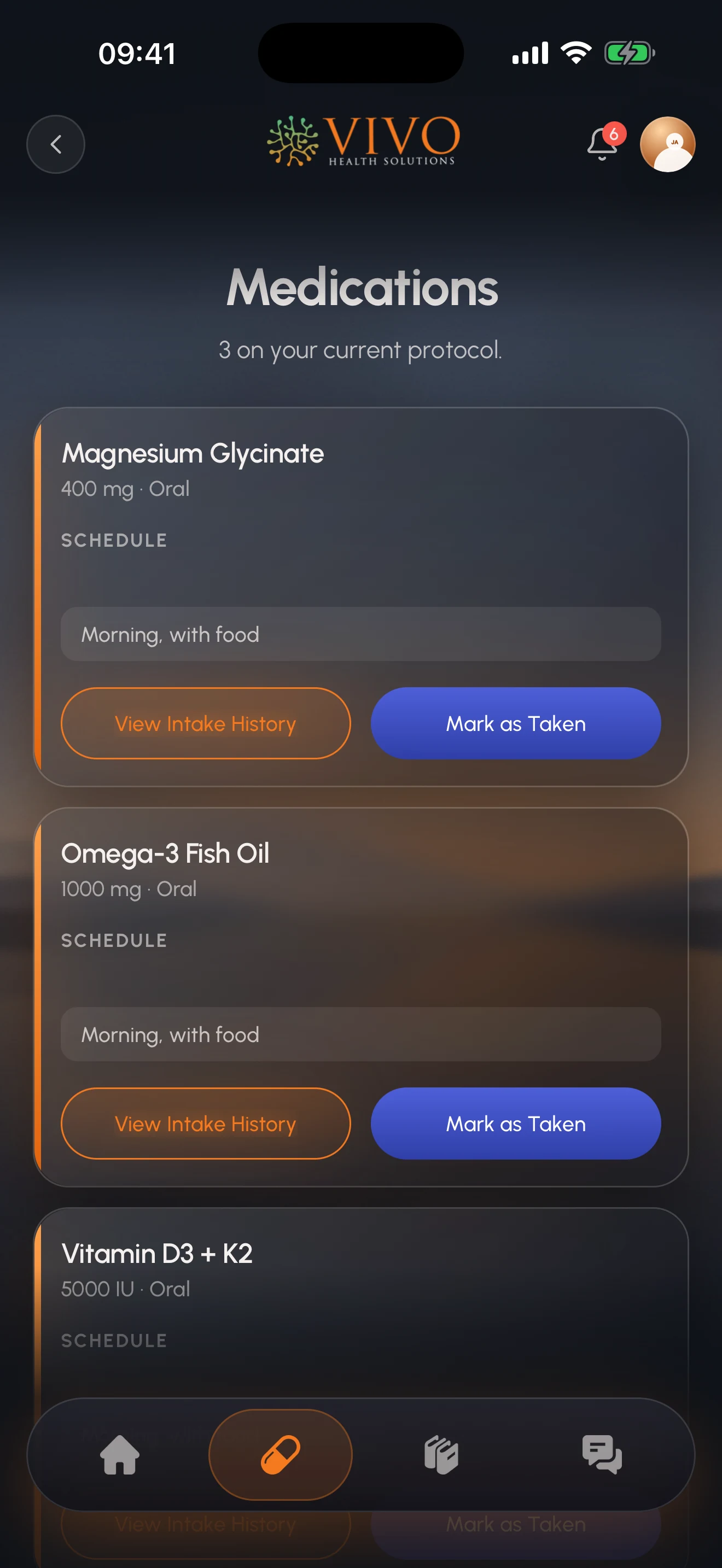
Each medication shows its strength, schedule and next dose. Turn reminders on, mark a dose as taken, and look back at your intake history whenever you want.

  • iPhone and Android app
  • Web portal: Every card side by side.
Medications in the web portal, side by side, with schedule, next dose, progress, Mark as taken and reminders
Medications on iPhone, each card showing the schedule, next dose, reminder switch and Mark as Taken

Chapter 2 · Your plan

Your provider's plan, and the supply to follow it.

02Step 2 of 9

Your protocol, day by day

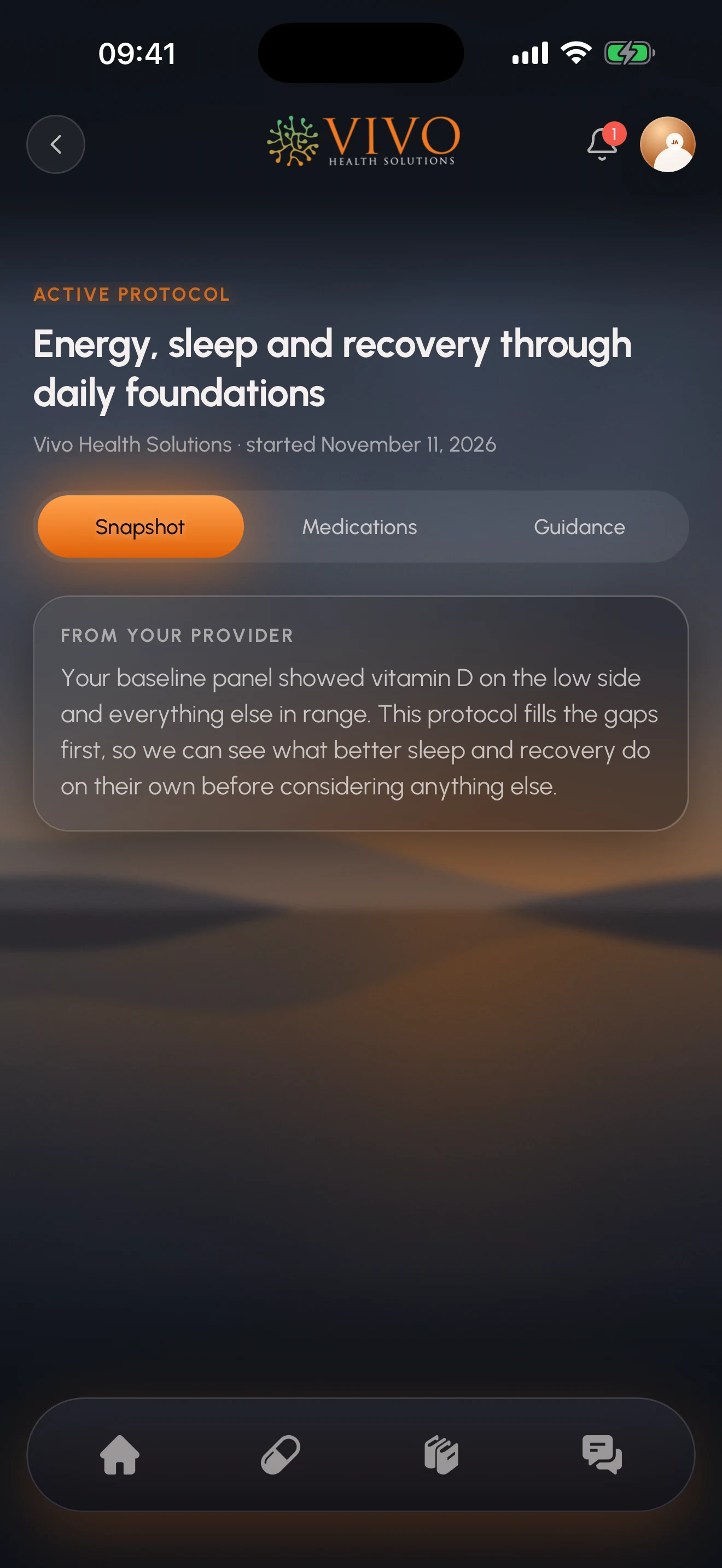
Your provider's plan, laid out clearly. Read your provider's notes and see which medications are on each day of the week, with doses shown in the units your provider prescribed.

  • iPhone and Android app
  • Web portal: The plan your specialist published.
The current protocol in the web portal: why this protocol, what is in it, and where it is heading
The current protocol on iPhone, with why your specialist chose it and the medications in it

04Step 4 of 9

Refills without the phone call

Request a refill in a couple of taps. Your care team reviews every request before anything ships, and medications due around the same time are bundled into one shipment. Follow your order all the way to your door, tracking number included.

  • iPhone and Android app
  • Web portal: Request and track.
Refills in the web portal, with supply left for each medication and a refill moving from requested to delivered
Refills on iPhone, showing days of supply left and a pending refill request under review by the care team

Chapter 3 · Your results

Your labs, all in one place.

05Step 5 of 9

Lab results in one place

Read the reports Vivo shares with you, and upload results from other labs so your provider sees the full picture.

  • iPhone and Android app
  • Web portal: From Vivo, and your own uploads.
Lab reports in the web portal, with reports from Vivo and your own uploads
Lab Reports on iPhone, with a baseline metabolic panel from Vivo

Chapter 4 · Your team

Your care team, a message away.

06Step 6 of 9

Talk to your care team

Message the Vivo team securely, straight from the app: your specialist, nurse support and the refills department.

  • iPhone and Android app
  • Web portal: Your care team, one click away.
A conversation with the Vivo care team in the web portal
A conversation with the Vivo care team on iPhone

07Step 7 of 9

Appointments, handled

See your upcoming consults, whether they're in person or by telehealth, and know which ones are confirmed.

  • iPhone and Android app
  • Web portal: What's coming up.
Appointments in the web portal, with a confirmed upcoming consult
Upcoming appointments on iPhone, with a confirmed consult

Chapter 5 · Learn

Understand your treatment.

08Step 8 of 9

Learn as you go

Vivo's library explains the peptides, hormones and treatments in your plan in plain language. It also has products and wellness tools: macros, meal plans, workout programs and guided meditation.

  • iPhone and Android app
  • Web portal: Education on your treatments.
The Vivo Library in the web portal, with reading and products tabs
The Vivo Library on iPhone, with articles on getting started, technique and how Vivo works

On your computer

Prefer a bigger screen?

Everything in the app is also in the Vivo web patient portal. Sign in with the same account and pick up where you left off.

The Vivo web patient portal home in a desktop browser: sidebar navigation, a greeting with Request a refill and Message the care team, summary cards, today's medications, orders and recent updates

Private by design

Built for health information.

The Vivo app doesn't replace medical advice from your provider. Messages are not for emergencies. In an emergency, call 911.

  • Encrypted.

    Your information is encrypted in transit, and you can lock the app with Face ID.

  • Your choice.

    You decide which notifications you receive.

  • Your account.

    You can delete your account from the app at any time.

Not a patient yet?

The app comes with your care.

Start with the new patient intake, or call 727-361-9873. Love your results? You can also become a Vivo Ambassador.

Questions

App questions.

What patients ask about the Vivo app and portal.

  • After your consultation, the Vivo care team creates your account. You'll get an email from Vivo that explains how to download the app and set your password.

  • No. Your account is tied to your care, so it's created for you when you start a program.

  • Yes. Everything in the app is also in the Vivo web patient portal. Sign in with the same account.

  • Yes, you can message your specialist, nurse support and the refills department. Messages are not for emergencies; in an emergency, call 911.

  • Your information is encrypted in transit, you can lock the app with Face ID, you choose which notifications you receive, and you can delete your account from the app at any time.